Thursday, 11 April 2013

Blog 3: Lighting

Lighting

What is Lighting used for?               

In-game lighting can change and create a different atmosphere of the area that is being lit. Simulating lights the the game can make the objects and the scenes more realistic rather than being stale and plain. Lighting can be used to draw attention to a certain object, person or scene.

Types of Lights

Specular Light

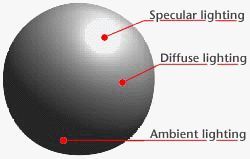
Specular light is the bright spot of the light that appears to make the object shiny. Specular light in computer graphics help make the 3D object look more realistic by giving the object a more reflective look. The specular light is used to determine the intensity by calculating the reflected light ray and the camera location.

Ambient Light

Ambient light is the amount of lighting in the scene. Ambient light is a soft indirect light that softens shadows and fills the scene with illumination. Ambient light is mainly used to provide the scene with a basic view of different objects.

Diffuse Light

Diffuse light is light that fills up the remaining area of the object or scene that the specular light does not hit. 


Emissive Light

Emissive light is a light that is emitting from an object in the scene. The emissive light is used to help make your objects or scene to be more realistic. Without emissive lights your objects or scene could look plain.

Per-Face vs. Per-Vertex vs. Per-Pixel

Per-Face

Per-Face lighting is calculating the amount of light that is hitting the object per face. The light intensity changes per face, making the object look blocky and rough. 

Per-Vertex

Per-Vertex lighting calculates the light that hits per-vertex. Next, it interpolates between the vertices and taking the average of lighting between each vertex.

Per-Pixel

Per-Pixel lighting calculate the light that hits per-pixel. Per-pixel lighting has the best result of the 3 because the program has more information to work with; resulting in giving the object a sharper look.


Blog 2: Introduction to Shaders

Introduction to Shaders

What are Shaders?

Shaders are a set of software instructions used primarily to calculate rendering effects on the graphics hardware. Shader is a computer program that runs on the graphics processing unit (GPU), and it is used to do shading, lighting, special effects and post-processing.

Types of Shaders

Vertex Shader

The vertex shader runs once for each vertex given to the graphics processor. The purpose of the vertex shader is to transform each vertex's 3D position to the 2D coordinate that appears in the screen. The vertex shader can manipulate properties such as position, colour and texture coordinates.

Geometry Shader

The geometry shader can generate new graphics primitives such as points, lines, and triangles. The geometry shader is written in OpenGL Shading Language (GLSL). The geometry shader can specifically say that a primitive is to be rendered to a certain layer in the framebuffer.

Fragment Shader

The fragment shader is also known as the pixel shader. The fragment shader is used to compute colour and other attribute of each fragment. The fragment shader is where most effects are done in. The fragment shader  is used to do colour, lighting, bump mapping, shadow mapping, and many other effects. The fragment shader can modify the depth of the fragment.


Graphics Pipeline


Thursday, 31 January 2013

Blog 1: Photoshop GDW Game

Photoshop GDW Game

Nax, The Pages of Sorcery

Objective: Take pictures of your GDW game and Photoshop them to make your game more appealing.

1. Main Menu (Original Version)
This was the original design of the main menu for Studio 6's game. The menu was created using Photoshop and had a couple of shading and lighting to the book.


(Edited Version)
This is the main menu after I have used Photoshop. I used the "Smudge Stick" from the "Artistic" filter to give the main menu more shadow and lighting effect to the book. This effect also gave more visibility to the words and made the book pop out more than the original version.


2. Book (Original Version)
This was the original colour design and texture for the magical book for our game. The colour choice for the book seemed too boring, and the magical symbol did not seem to pop out to the viewer.


(Edited Version)
This is the edited version after I have used Photoshop. I have used the "Glowing Edges" from the "Stylize" filter to make the book seem a bit more fitting to the rest of the scenery. This filter make the magical symbol seem to stand out more than the original version.


3. In-Game (Original Version)
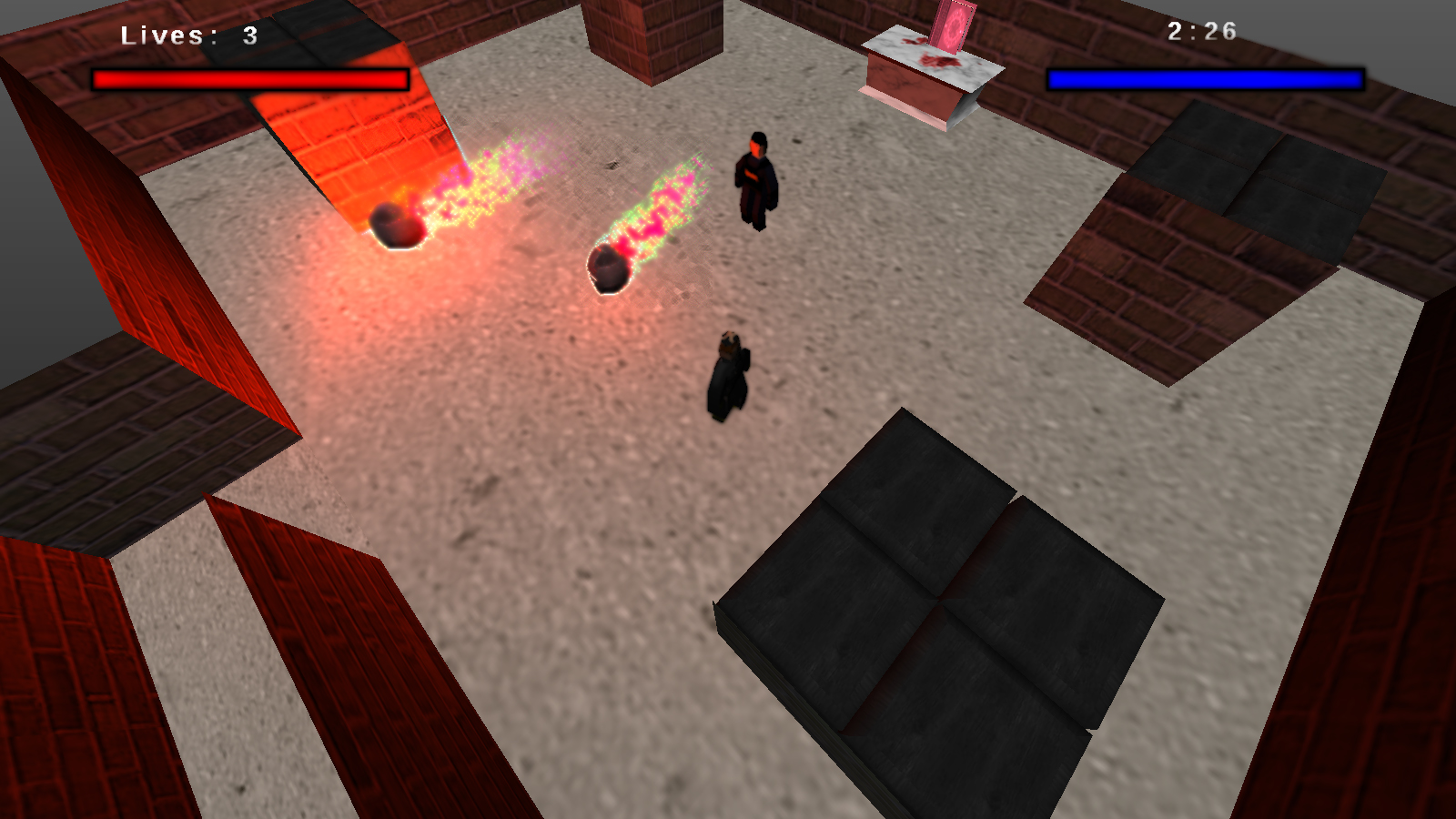
This is the original version for one of stages in our game. The particles and the light emitted were lacking, and the HUD was too stale. 


(Edited Version)
This is the edited version after I have used Photoshop. I have used the blur effect to brighten the effects of the particles to make it seem brighter and shinier. I have also used the blur tool to darken the health and mana bars in the HUD to give it more depth.